Xenify Calc
The spreadsheet that does the fiddly parts.
Look-ups in three clicks. Sheets that stay linked to your database or a CSV file. Every digit of every number. Opens and saves .xlsx files, free on your computer or in your browser.
Look up
VLOOKUP, without writing a VLOOKUP.
Put the cursor where the answers go and click Look up. Click the table to look in, the column to match on, and one example of the answer you want. Calc shows what it will fill in before it does.
Then it writes the formulas for you, using the table’s own column names, so they keep working when rows are added. The formula is in each cell if you ever want to change it.
Databases
Your database, as a sheet.
Pick a database your Xenify server connects to, then the table and the columns you want. Read it as a sheet that refreshes, or edit the table like any other cells.
Changes wait until you save, then go to the database with your name on them. If someone changed a cell first, you choose which value stays. Your admin decides which tables can be edited.
Edit the database from the sheet. Link a sheet to a table and a change you save goes straight into the database, so the records your other systems use can be looked after in a spreadsheet.
Linked CSV files
A sheet that follows a CSV file.
Link a sheet to a CSV file, like the export another program writes every night, and Calc keeps the sheet in step with it. On your computer it notices when the file changes and reads it again straight away. On a Xenify server it picks up each new version saved to your files.
Totals, charts and formulas on your other sheets follow along, so a report built on the export is always current. The linked sheet can't be typed over by accident, and one click turns it back into an ordinary sheet.
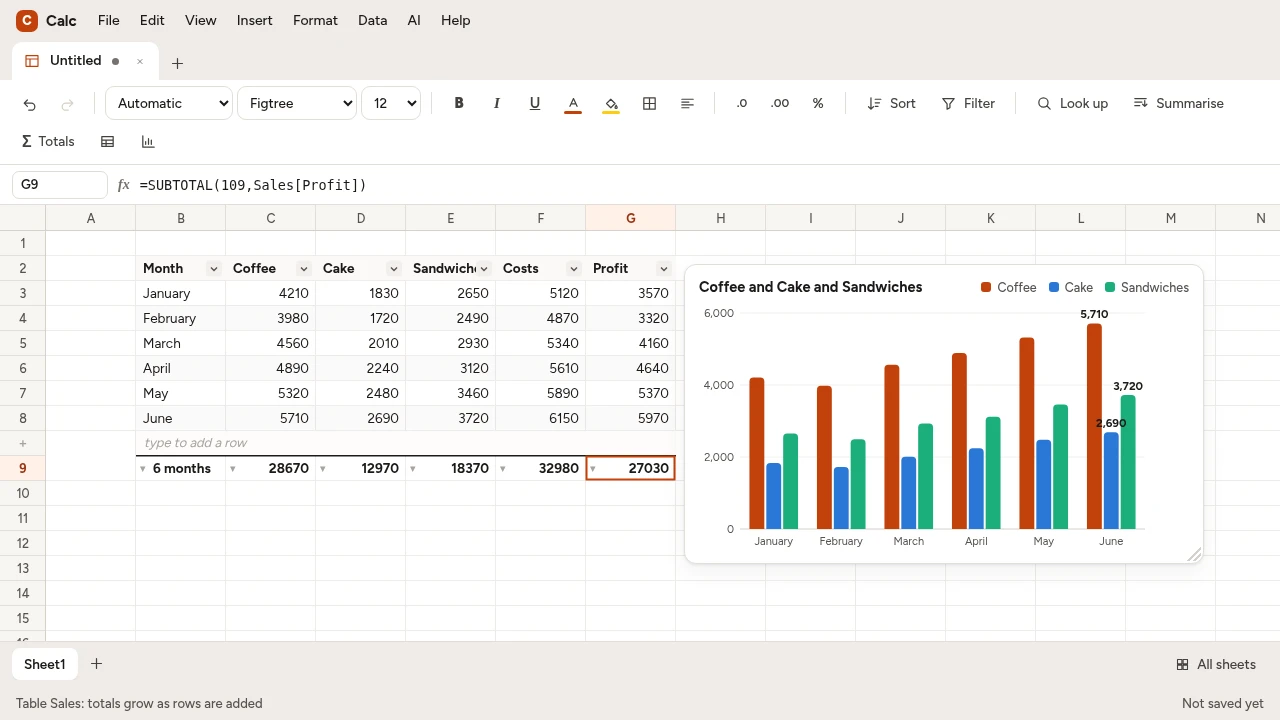
Every digit
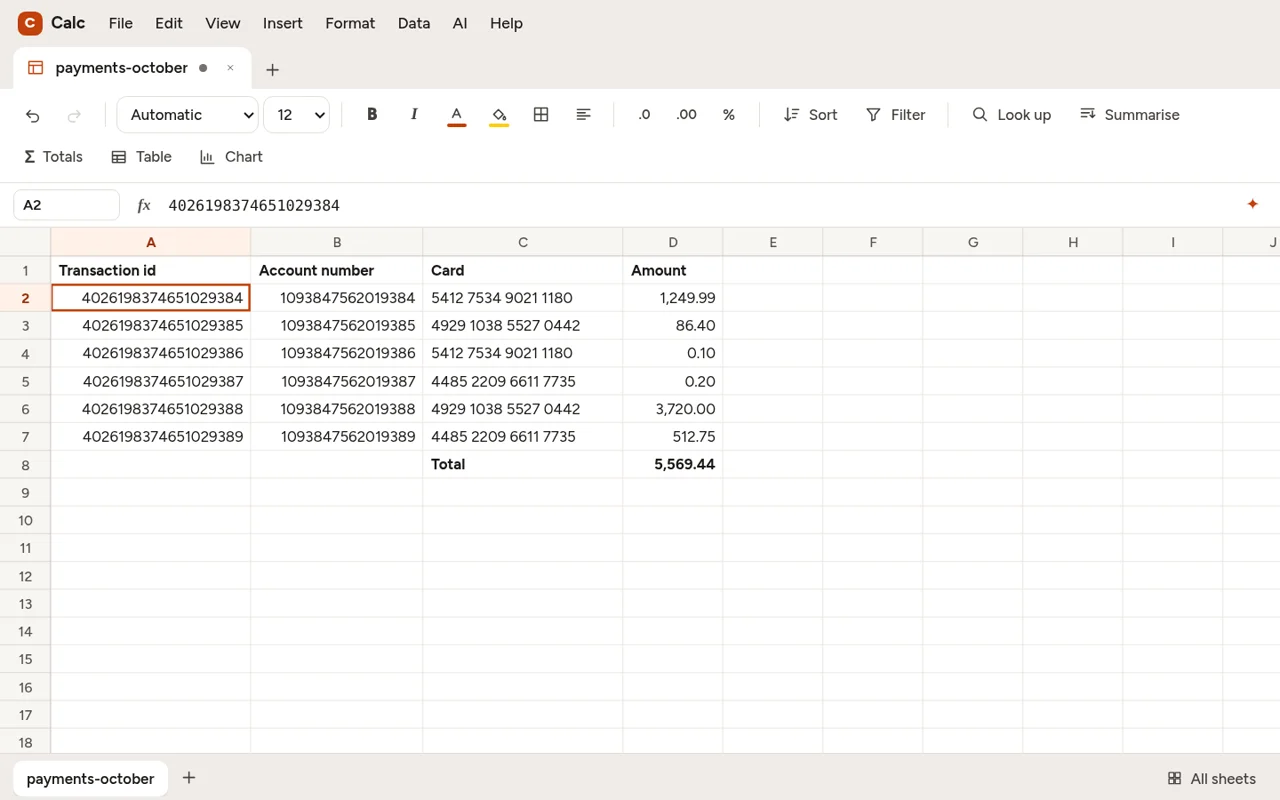
Long numbers don’t lose their digits.
Open a file of transaction ids or account numbers in most spreadsheet programs and the long ones turn into 4.02620E+18, with everything after the fifteenth digit swapped for zeros.
Calc remembers up to 28 digits exactly. Ids stay ids, money adds up to the cent, and two numbers that differ only in the last digit stay different in look-ups, filters and totals.
- Most spreadsheets
- 4.02620E+18stored as 4026198374651020000
- Calc
- 4026198374651029384stored as 4026198374651029384
Formulas
Formulas that help you write them.
Start typing and Calc suggests the function. Inside its brackets it shows what each part wants. The function dictionary explains every function with a worked example you can try on a new sheet.
When a formula goes wrong, a line under the formula bar says what the error means, with “did you mean” for a misspelt name. Or describe what you want with ✦ and the AI writes the formula, showing its result before anything goes in the cell.
Spelling and grammar
Spelling and grammar, in your cells.
Text in cells is checked as you type, with the same checker as Xenify Write, on your computer. Red for spelling, blue for grammar. Right-click for the fix.
Codes in capitals and numbers are left alone, and words you add to the dictionary count in Write and Draw too.
Pictures
Pictures on the sheet.
Put a logo, a product photo or a scanned receipt on a sheet. Move it and size it where you want, and it’s saved with the book, in Calc files and .xlsx files alike.
In Write
Put the numbers in your report. They stay up to date.
In Xenify Write, Insert › From Calc puts a range or a chart from a book into your document. Link it and the document follows the book: change a number in Calc and the report shows the new figure.
Or embed it as it is now, a copy that stays put. Works with books on your computer or on your Xenify server.
Ask
Reports from your numbers, worked out your way.
Ask turns a day of transactions into the reports a business runs on: takings by product, costs, gross and net profit, VAT, the busiest hours. Before it adds anything up, Ask checks how you work things out, like what counts as profit, and saves your answer as a note on the column, so every report after that uses the same definition.
Keep your business numbers in-house. The AI can run on your own computer or your Xenify server, so your figures never have to leave the building. Or pick a provider you trust. It stays off until you choose.
Ask can use tools from MCP servers you add, and AI apps you allow can read and edit your books through MCP.
And everything you’d expect.
Free for Windows, Mac and Linux.
Xenify Hub installs Calc and keeps it up to date. Or open it in your browser, nothing to install.